In a previous post, I wrote about how to deploy Flan-T5 XXL in Vertex AI Prediction. This post shows how to fine-tune a FLAN-T5 XXL model (11B parameters) with Vertex AI Training. The model will be fine-tuned using a a2-highgpu-8g (680 GB RAM, 96 vCPU) machine with 8xA100 GPUs, using the DeepSpeed library.
The fine-tuning of a model of this size can take one or more days. For this example the fine-tuning can cost around USD 720 per day.

The dataset: CNN Dailymail
This post will use the CNN dailymail dataset which contains news summarization.
The dataset is preprocessed by running the script preprocessing/create_flan_t5_cnn_dataset.py, which will tokenize the dataset, split the dataset into training and eval, and save it to disk.
The tokenized datasets will then be copied to a custom docker image required for Vertex AI Training.
The model: Flan-T5 XXL
If you are familiar with T5, an open-source LLM model from Google, Flan-T5 outperforms T5 at almost everything. For the same number of parameters, Flan-T5 models have been fine-tuned on more than 1000 additional tasks covering more languages.
Flan-T5 XXL is released with different sizes: Small, Base, Large, XL and XXL. XXL is the biggest version of Flan-T5, containing 11B parameters. Original checkpoints from Google for all sizes are available here.
The Flan-T5 XXL model card can be accessed here.
DeepSpeed ZeRO
DeepSpeed is a wrapper library built on top of PyTorch to train advanced deep learning models, like Large Language Models (LLM).
It performs memory-efficient data parallelism and enables training with model parallelism, doing better than existing frameworks like PyTorch’s Distributed Data Parallel. For example, DeepSpeed can train models with up to 13 billion parameters on a single GPU without Out-of-Memory (OOM) issues, or up to 200 billion parameters with model parallelism on multiple GPUs.
DeepSpeed reduces the training memory footprint through a novel solution called Zero Redundancy Optimizer (ZeRO), which partitions model states and gradients across accelerators, implemented as incremental stages of optimization:
- Stage 1: optimizes states.
- Stage 2: optimizes states and gradients.
- Stage 3: optimizes states and gradients and weights. Additionally, this stage also enables CPU-offload to CPU for extra memory savings when training larger models.
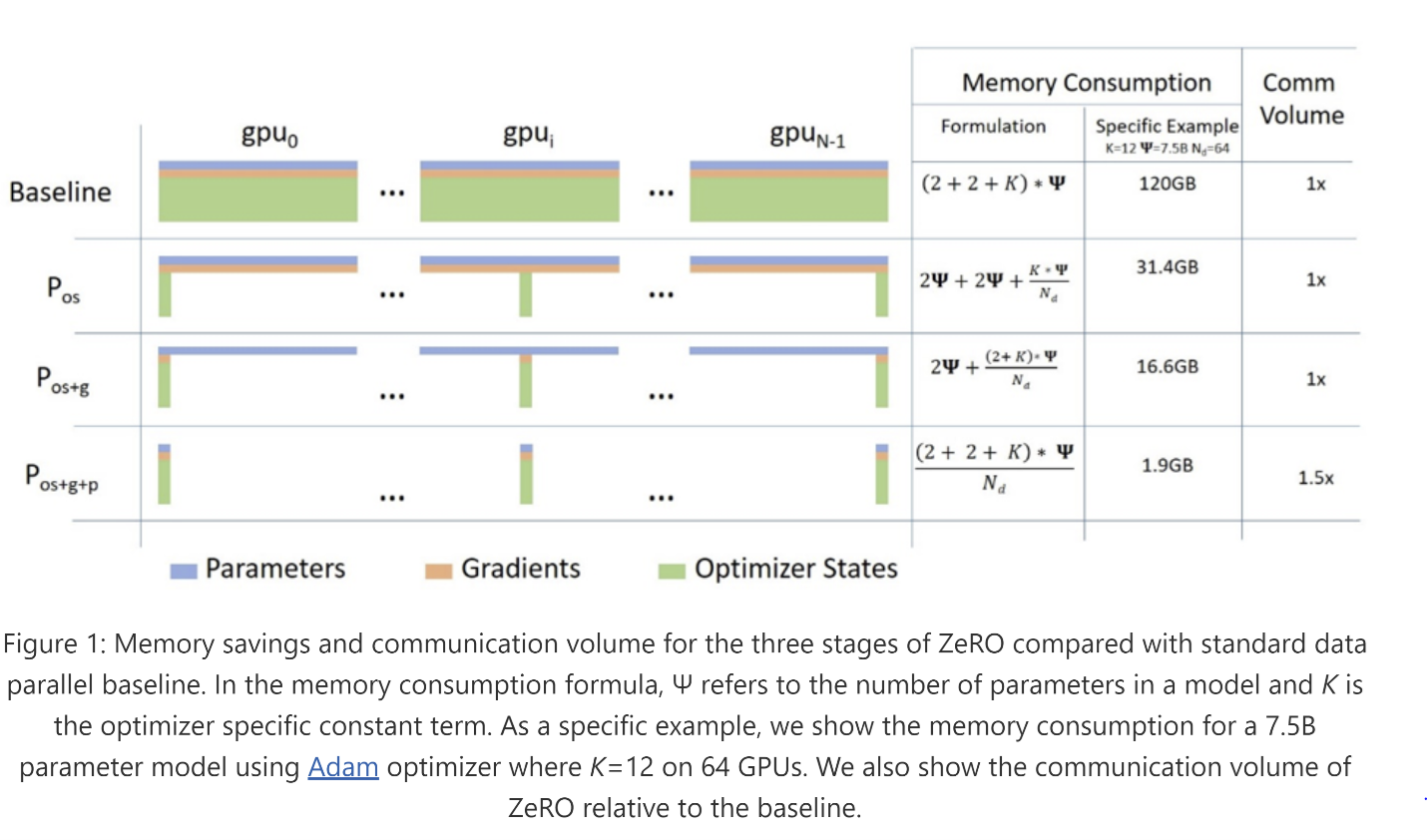
Since Flan-T5 XXL weights are around 45 GiB, without even considering optimizer states or gradients, we must use model parallelism with a framework like DeepSpeed.
In this example, I will use stage 3 optimization without CPU offload, i.e. no offloading of optimizer states, gradients or weights to the CPU.
The configuration of the deepspeed launcher can be done through constants in the file run_seq2seq_deepspeed.py. Note the file configs/ds_flan_t5_z3_config_bf16.json to configure specific parameters related to Stage 3 optimization:
MODEL_ID = "google/flan-t5-xxl"   # Model id to use for training, in Hugging face
TRAIN_DATASET_PATH = "data/train" # Path to processed dataset
TEST_DATASET_PATH  = "data/eval"  # Path to processed dataset
EPOCHS = 3
PER_DEVICE_TRAIN_BATCH_SIZE = 8 # Batch size to use for training
PER_DEVICE_EVAL_BATCH_SIZE = 8  # Batch size to use for testing
GENERATION_MAX_LENTH = 129      # Maximum length to use for generation
GENERATION_NUM_BEAMS = 4        # Number of beams to use for generation
LR = 1e-4                       # Learning rate to use for training
SEED = 42                       # Seed use for training
DEEPSPEED_FILE = "configs/ds_flan_t5_z3_config_bf16.json" # deepspeed config file
GRADIENT_CHECKPOINTING = True   # Whether to use gradient checkpointing
BF_16 = True                    # Whether to use bf16
Build Custom Training Container image
Now we need to build the custom training image containing the DeepSpeed training code and the tokenized dataset. Note the dataset preprocessing is already done in a previous step.
FROM europe-docker.pkg.dev/vertex-ai/training/pytorch-gpu.1-10:latest

WORKDIR /

LABEL com.nvidia.volumes.needed=nvidia_driver

# env variables for proper GPU setup
ENV PATH=/opt/conda/bin:/usr/local/sbin:/usr/local/bin:/usr/sbin:/usr/bin:/sbin:/bin
ENV NVIDIA_VISIBLE_DEVICES=all
ENV NVIDIA_DRIVER_CAPABILITIES=compute,utility
ENV LD_LIBRARY_PATH=/usr/local/nvidia/lib:/usr/local/nvidia/lib64

# copy deepspeed config file
COPY configs /configs

# copy preprocessed data. Need to run "create_flan_t5_cnn_dataset.py" first
COPY data /data

# copy deepspeed launcher
COPY run_seq2seq_deepspeed.py run_seq2seq_deepspeed.py

# install dependencies
RUN pip3 --timeout=300 --no-cache-dir install torch==1.10.0+cu113 -f https://download.pytorch.org/whl/cu113/torch_stable.html
COPY requirements.txt requirements.txt
RUN pip install -r requirements.txt

# Sets up the entry point to invoke the trainer with deepspeed
ENTRYPOINT ["deepspeed", "--num_gpus=8", "run_seq2seq_deepspeed.py"]
Push docker image to Artifact Registry. This process can take up to one hour:
gcloud auth configure-docker europe-west4-docker.pkg.dev
gcloud builds submit --tag europe-west4-docker.pkg.dev/argolis-rafaelsanchez-ml-dev/ml-pipelines-repo/finetuning_flan_t5_xxl
Fine-tuning
The model is ready to be fine-tuned on Vertex AI with 8xA100 NVIDIA A100 GPU (40 GB HBM). This code launches a CustomContainerTrainingJob since you have a Docker image with the training package embedded into it. The workload is run in Vertex AI Training (fine-tuning in our case), which includes an upload of the model to Vertex AI Model Registry.
The fine-tuning should take 23-25 hours to complete and can cost around 750 USD. Metrics can be accesed in the logs, for this model I got + : 1.288099765777588, eval_rouge1: 44.6169, eval_rouge2: 21.7342, eval_rougeL: 31.6094 and eval_rougeLsum: 41.466 with 3 epochs.
job = aiplatform.CustomContainerTrainingJob(
    display_name="flant5xxl_deepspeed_" + TIMESTAMP,
    container_uri=TRAIN_IMAGE,
    model_serving_container_image_uri="europe-docker.pkg.dev/vertex-ai/prediction/pytorch-cpu.1-12:latest"
)

model = job.run(
    replica_count=1,
    service_account = SERVICE_ACCOUNT,
    tensorboard = TENSORBOARD_RESOURCE,
    boot_disk_size_gb=600,
    machine_type="a2-highgpu-8g",
    accelerator_type="NVIDIA_TESLA_A100",
    accelerator_count = 8,
)
Summary
This post summarizes how to fine-tune a Flan-T5 XXL in Vertex AI Training. This model has a size of 45 GiB and has been fine-tuned with 8xA100 GPU.
You can find the full code in this repo.
I would like to thank Camus Ma for comments and contributions to this post.
References
[1] Medium post: Fine-tuning Flan-T5 Base and online deployment in Vertex AI
[2] Medium post: Deploy FLAN-T5 XXL in Vertex AI Prediction
[3] Google blog: The Flan Collection: Advancing open source methods for instruction tuning
[4] Research paper: FLAN-T5
[5] Original FLAN-T5 Checkpoints from Google
[6] Phil Schmid blog: Fine-tune FLAN-T5 XL/XXL using DeepSpeed & Hugging Face Transformers
[7] DeepSpeed training documentation